Convert 3MF
to IGES.
Updated 2026-10-27
To convert 3MF to IGES, drop the .3mf into the converter below and download the IGES file. It is in millimetres, and the body is stored as an IGES solid rather than a pile of loose faces. Where the mesh allows, planes, cylinders, cones, spheres and tori are rebuilt as true surfaces. Elsewhere you get smooth patches or facets, and the download says which. 2 solid conversions a day need no account. If the person who asked for IGES can also read STEP, send STEP. It is the newer format and carries the same surfaces.
2 solid-geometry conversions a day with no account. No card, no install.
On our servers. No account: deleted within 24 hours. Signed in: kept until you delete them. Never shared or used for training.
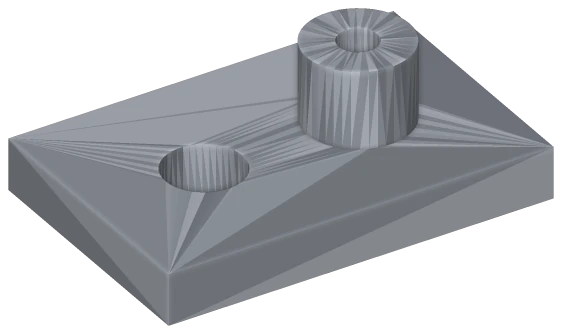
One face per triangle · 524 faces. Each hole is a ring of flat strips you cannot select or measure.
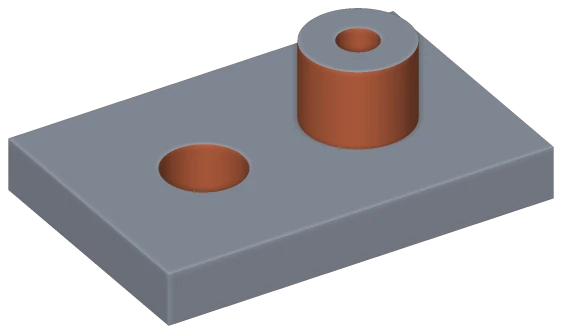
MeshWeave · 10 faces: 7 planes and 3 cylinders. The hole measures Ø12.00 mm.
Surfaces are only as accurate as the mesh they come from, and there is no feature history.
What changes between 3MF and IGES
IGES is an older exchange format. CAM packages, some machine shops and long-lived CAD installations still ask for it. It describes surfaces exactly and knows nothing about print plates, filaments or the slicer settings a 3MF carries. So the converter has to rebuild surfaces from the 3MF's triangles and write them in a form IGES can hold.
The surfaces are found the same way as for STEP, and the IGES is written from that same solid. A region lying on a plane, cylinder, cone, sphere or torus becomes one exact face. Freeform areas become smooth patches. If recovery fails altogether, the body is faceted. CAD and CAM systems expect to read back a solid, and that is how the file stores it.
Every object placed on the plate is read, slicer projects included, and they arrive together. Colours, paint, supports and print settings stay behind. The numbers are not rescaled. Nearly every 3MF is in millimetres, so the IGES comes out at true size. This conversion runs on our servers. The in-browser mode writes STEP, not IGES.
Should I send IGES or STEP?
Will the CAM software see a solid or loose surfaces?
Can I make the IGES in my browser?
Will the IGES be the right size?
What happens to the colours and the plate layout?
Questions about daily limits, file sizes, privacy or deletion? They work the same for every conversion. See the FAQ and pricing.
Convert 3MF to something else
Convert something else to IGES
Going the other way? Convert IGES to 3MF.