Use it from Claude.
Connect your own Claude once. Then ask it, in plain words, to bring in a part, set up a study, tell you the price and run it.
claude.ai, the Claude desktop and mobile apps, and Claude Code.
Connect
Claude app (claude.ai or the desktop app)
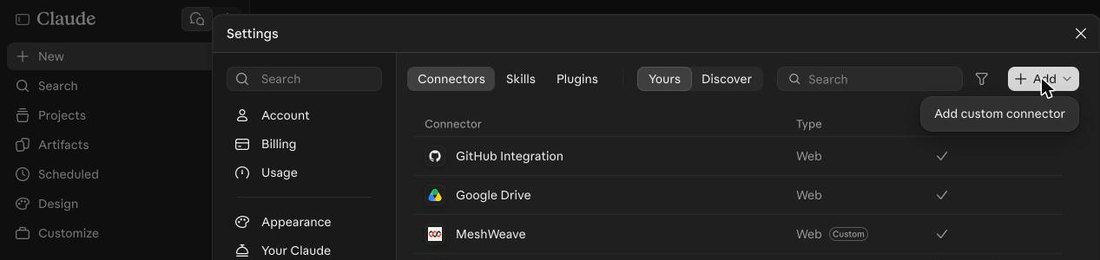
- 1Customize → Add → Add custom connector
- 2Name it MeshWeave, paste the address, Continue, then Add
https://meshweave.app/mcp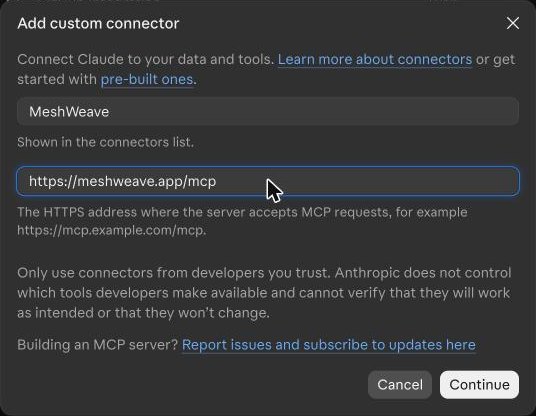
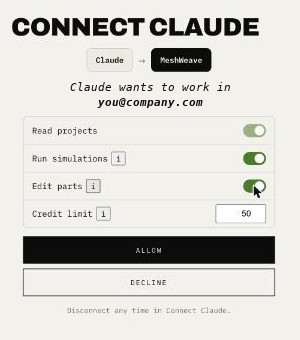
- 3MeshWeave opens: press Allow
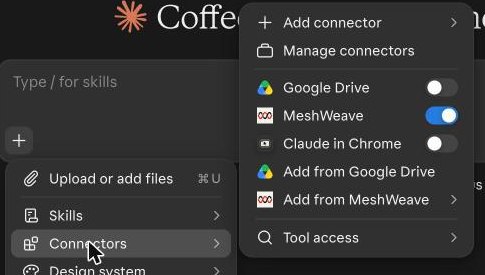
- 4In a chat: + → Connectors → MeshWeave on. Then just ask.
Claude Code
- Run
claude mcp add --transport http meshweave https://meshweave.app/mcp - Type
/mcpand sign in to MeshWeave
Then ask
- Bring in bracket.step and check it holds 200 N on the end tab.
- What would a strength check on this part cost?
- How far does the end move under that load?
- Open my last run and show me the result.
Before it spends a credit, Claude tells you the price and waits for your yes.
What it can do
- Read your projects and their results
- Bring in a part and name its faces, if you allow editing
- Price a run, then start it when you say yes
- Read back the result, with a link that opens it on the part
- See your password or your Claude login
- Delete anything
- Change your account, keys or billing
- Spend past the credit limit you set
- Reach any other account
Your own agent
Building on the Claude API? Make a key in MeshWeave under Connect Claude → API key and give your agent the same address. For scripts without Claude, see the Flow API.
Questions
Does MeshWeave see my Claude login or my Anthropic key?
No. Your Claude signs in to MeshWeave, the way it signs in to any other connector. MeshWeave never asks for your Claude password or an Anthropic key, and keeps neither.
What does it cost?
Runs cost the same credits as in the app. Claude tells you the price and waits for your yes before it starts one, and each connection has a credit limit you set when you connect. Reading your projects is free.
How do I disconnect it?
In MeshWeave, open the account menu, Connect Claude, and press Disconnect beside it. It stops working at once, in every Claude app it was added to.
Who can use it?
Any MeshWeave account with the engineering tools switched on. It works in your own account, on your own credits.
Is Claude’s summary of a run checked?
Claude’s summary is not a second check of the run. The run’s own verdict, shown with its result in MeshWeave, is the one that counts: open the link Claude gives you to see it.