MeshWeave — open, view and convert CAD files in the browser, then lighten and verify them

Open, view and convert SolidWorks, STEP, IGES, Parasolid, Rhino, STL, OBJ and 3MF with nothing installed. STL to STEP comes back with real planes and cylinders. Lattice, topology, FEA, flow and thermal tools are in early access.

Five free conversions a day, no account. See every conversion or view a file free.

No account needed
Drop a CAD fileSLDPRT · SLDASM · STEP · STL · OBJ · 3MF

On our servers. No account: deleted within 24 hours. Signed in: kept until you delete them. Never shared or used for training.

ToolsOne part, every workspace

Upload once; every tool works on the same part. Everything below is real output, not drawn. Converting and viewing are open to everyone; the engineering workspaces are in early access.
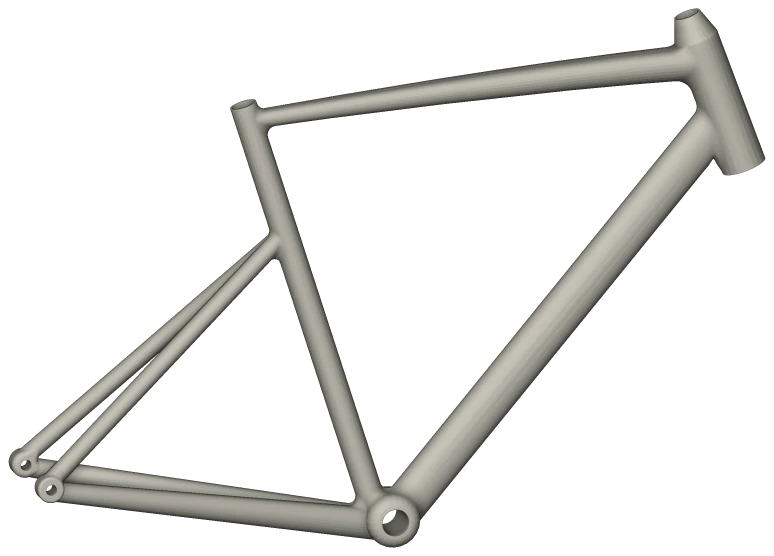
A bicycle frame in side view, opened and shaded in the browser
Convert

Open SolidWorks, STEP, IGES, Parasolid, Rhino, STL, OBJ, 3MF and more with nothing installed — 234 conversions, both directions. Multibody parts keep their bodies and names; SolidWorks parts open with their feature tree, and one from a newer release can be saved for an older one.

A bicycle frame, opened straight from its part file.
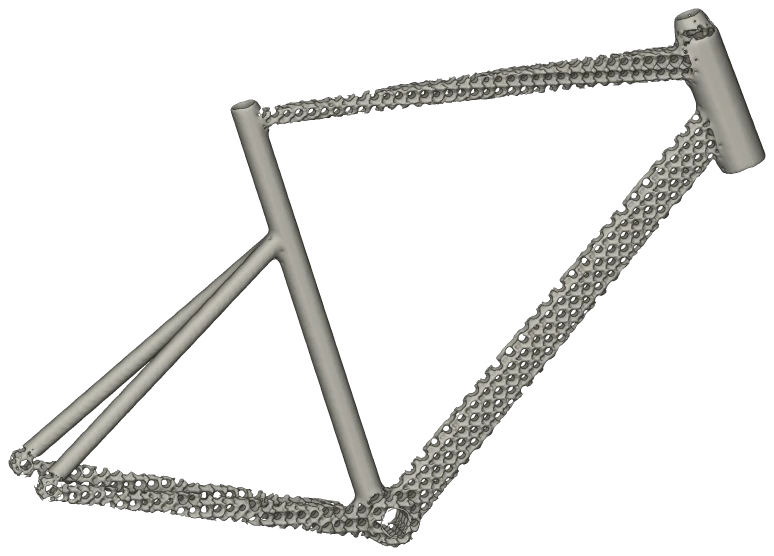
A bicycle frame in side view with its top tube, down tube and chainstays filled with an octet strut lattice
Lattice

Fill a part with a strut lattice, sized to its walls automatically or by hand. Watertight, print-ready, exports to STEP.

The same frame on a 14 mm octet cell. The seat tube and stays came back solid: too thin to take a cell.
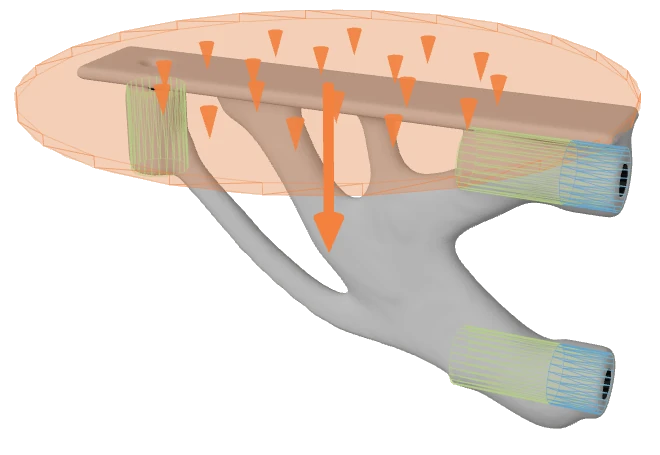
A shelf bracket reduced to branching load-path members, with the block it was cut from ghosted behind it and the load arrows still in place
Topology

Name a target safety factor and get the lightest body that reaches it. FEA runs inside the loop, so the shape that comes back already passes.

A shelf bracket: 132.1 g of PLA down to 33.0 g. One run returns every body from safety factor 37.7 to 3.6.
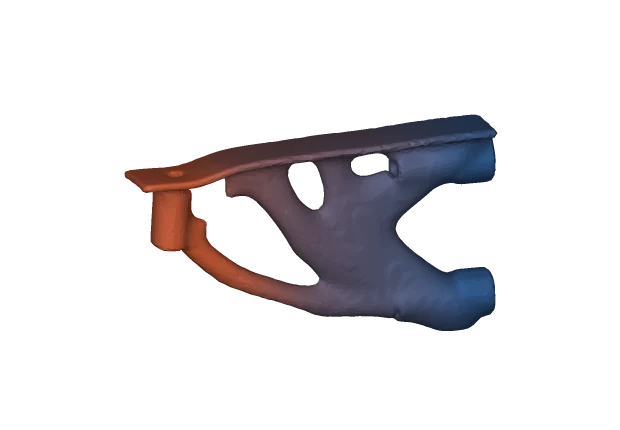
The shelf bracket bending under load, animated, coloured from blue where it is held to warm where it moves most
Verify

Quadratic-tet FEA on the real geometry: stress, deflection, natural frequencies and buckling, with multiple load cases and bolt and bearing supports.

One body from that family: 39.5 g, 70 % lighter, safety factor 16.1. Drag the bar to exaggerate the real 0.158 mm deflection.

A tower heat sink painted by surface pressure, red at the fan face and blue through the fin stack, with air flowing along solved streamlines
Flow & thermal

Place heat sources, inlets and outlets; get temperature, pressure drop, drag and streamlines back. A 48-fin heat sink solves in seconds.

A real saved run — drag it. Fins 27.6 °C, base 28.2 °C: near-isothermal by design (fin efficiency 0.958). Airflow is the bottleneck three to one.
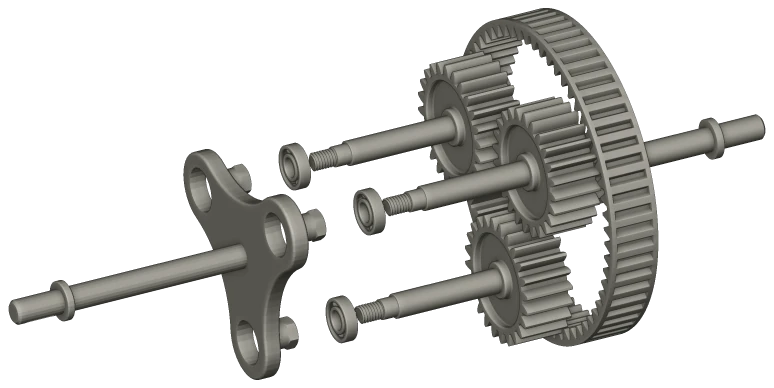
A planetary gearbox assembly exploded along its axis into ring gear, planets, carrier and sun
Assembly

Open a SolidWorks assembly with its mates. Drag a part and the rest follow; add a mate and save it back.

A planetary gearbox, exploded along its axis, with thirty mates read.
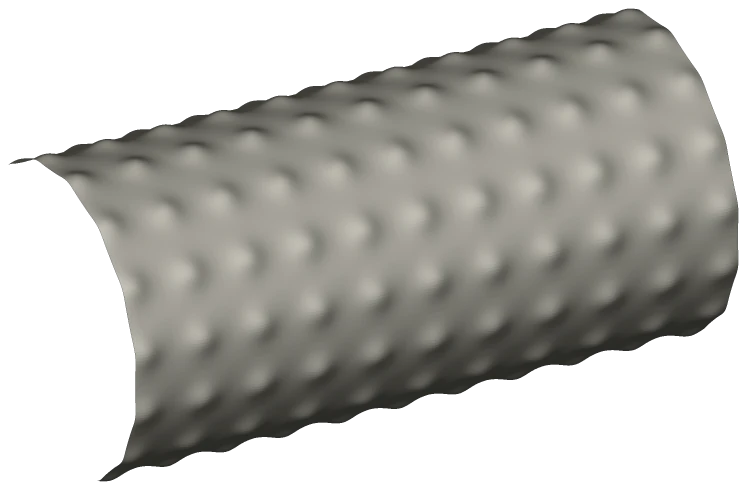
A length of round tube covered in a square grid of raised dots
Texture

Displace a surface with dots, hex, lines or noise. Real geometry, not a bump map — watertight and print-ready.

A 13 mm dot pattern, 1.3 mm proud of a Ø64 tube.
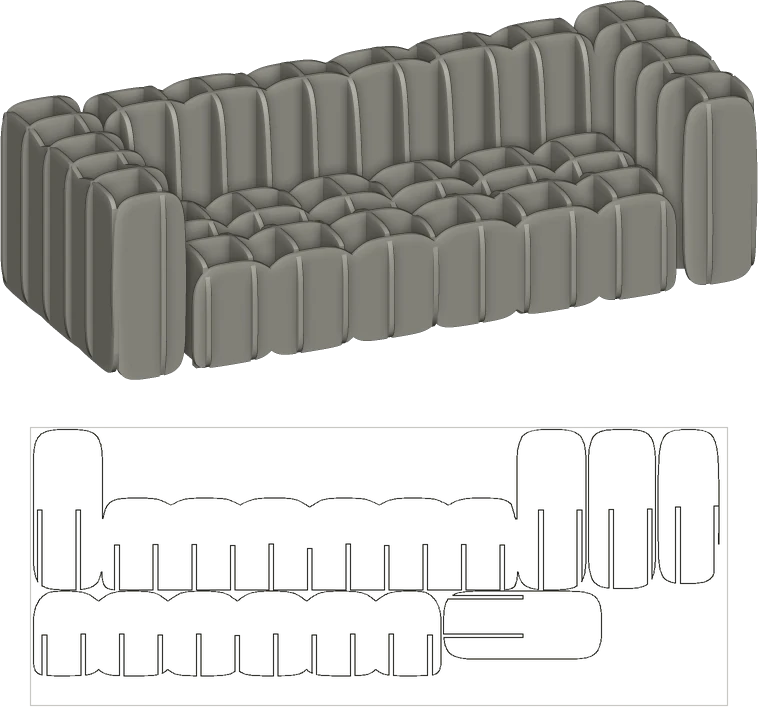
A couch built as an interlocking egg-crate of plywood slabs, above one nested sheet of the cut parts that build it
Slicer

Cut a solid into an interlocking waffle or stacked layers. Kerf compensated, nested onto sheets, out as SVG and DXF.

A 2.4 m couch as 25 slabs of 18 mm ply, nested onto ten boards. Below it, one sheet as the cut file.

AccuracyAgainst closed form

Every reference is a closed-form solution, not another FE code. Structural cases: a 100 × 10 × 10 mm steel cantilever.

Axial elongation
vs FL/AE
−0.30 %
Tip deflection
vs Timoshenko beam
−0.51 %
First bending mode
vs Euler–Bernoulli
−0.26 %
Critical buckling load
vs π²EI/(2L)²
−0.29 %
Steady conduction
vs 1-D analytic bar
within 1 %
Duct pressure gradient
vs plane Poiseuille
−0.2 %

Where a number does not converge it is flagged, not printed: design stress is read at the 99th percentile.

CostFree to start

Five conversions a day with no account. Accounts are free, need no card, and start with 25 credits. Paid plans start at $7 a month.

See pricing Create free account

Questions12 answered
How do I open a SLDPRT file without SolidWorks?
Drop it in the converter above — no account, nothing installed. Convert to STEP for CAD, or STL, OBJ and 3MF for printing. Five free a day, two of them to solid formats such as STEP.
Can I view a STEP, SLDPRT or STL file online?
Yes, free. Meshes such as STL, OBJ and 3MF open in your own browser and are never uploaded; STEP, SOLIDWORKS, Parasolid, IGES and Rhino files are turned into a view on our servers, 60 a day with no account.
Will an STL converted to STEP have real surfaces?
Yes. Planes, cylinders, cones, spheres and tori are recovered from the triangles, so a round hole comes back as one cylinder you can measure, not hundreds of flat slivers. No conversion can recover the feature tree.
Can I get results back into CAD?
Yes. Every result exports as STEP for Fusion 360, Inventor, Onshape, SolidWorks and FreeCAD — a solid body, not a rebuilt feature tree.
Can I open a newer SolidWorks file in an older version?
Yes, for parts. Choose Older SLDPRT in the converter for a native part for SolidWorks 2025 or 2024; for older releases convert it to STEP, which every release opens as a solid body. Exact surfaces, no feature tree, no SolidWorks needed.
Does it handle assemblies and multibody parts?
Yes. Assemblies open with their components and mates. Multibody parts keep their bodies and names.
Is the FEA real, or an approximation?
Real: a quadratic-tet finite-element solve on the actual geometry, within 0.51 % of closed-form answers on a steel cantilever. Singular peak stress is flagged, and design stress is read at the 99th percentile.
Does the simulation run in my browser?
No. The browser is the workspace; the solves run on our servers, so they take minutes and nothing needs installing.
Is it safe to upload my files?
Files travel encrypted and are processed on our own servers only. No third parties, no ads or trackers, no AI training on your files. You can also skip the upload: choose In your browser above the converter and meshes (STL, OBJ, 3MF, PLY, glTF) and STEP files convert on your own device, never uploaded.
Do you keep the files I convert?
Only if you want us to. Without an account, files are deleted within 24 hours. Signed in, the original and every conversion stay in your files until you delete them; deleted files leave our servers within 24 hours.
What are credits?
Server compute — lattice, topology, FEA, flow and thermal — costs credits. Conversions use a daily allowance instead: 5 a day with no account, 4 solid files a day on a free account, unlimited on Maker. Accounts are free and start with 25 credits; the engineering tools are in early access, switched on per account.
What does it cost to try?
Nothing. Five conversions a day with no account, two of them to STEP, IGES or a native CAD part. A free account starts with 25 credits; early accounts keep these prices.