Convert 3MF
to SLDPRT.
Updated 2026-10-27
To convert 3MF to SLDPRT, give the converter here your .3mf. You get back a native SOLIDWORKS part that opens in SOLIDWORKS 2026 as an imported body. Planes, cylinders, cones, spheres and tori in the print mesh are usually rebuilt as true faces, so you can measure and mate a hole. Where nothing fits, the region stays faceted, and the download says which you got. 2 solid conversions a day need no account. If the 3MF came from a CAD model, the designer's own part or a STEP of it is a better source.
2 solid-geometry conversions a day with no account. No card, no install.
On our servers. No account: deleted within 24 hours. Signed in: kept until you delete them. Never shared or used for training.
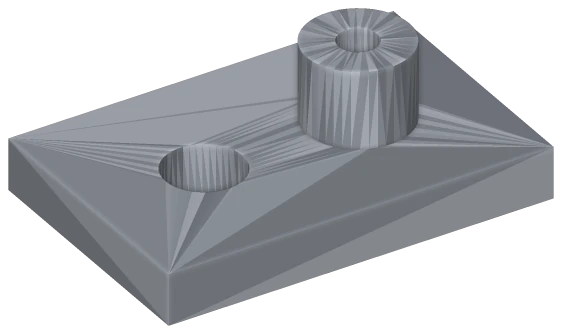
One face per triangle · 524 faces. Each hole is a ring of flat strips you cannot select or measure.
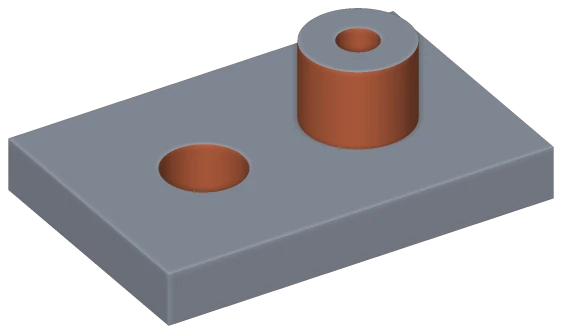
MeshWeave · 10 faces: 7 planes and 3 cylinders. The hole measures Ø12.00 mm.
Surfaces are only as accurate as the mesh they come from, and there is no feature history.
What changes between 3MF and SLDPRT
A 3MF is built for the printer. It holds triangles, the plate they sit on, colours and slicer settings. A SOLIDWORKS part needs closed bodies made of real faces. So the converter finds the surfaces the triangles stood for, then writes them as a part SOLIDWORKS can open.
A part file holds one body, and a plate often holds several objects. Every object in the 3MF is read in its place. If the result has more than one body, the converter stops and asks what you want. You can have all of them as one multibody part, an assembly with a part per body and no mates, or only the first. The first two arrive as a Parasolid file that SOLIDWORKS opens directly. The third is the SLDPRT.
The mesh has to enclose a solid. A 3MF made for printing usually does, but one stitched from several shells, or one with holes, may not. If it does not, nothing is charged. The converter offers to rebuild it into a closed solid and shows how much of the surface would move, and how far, before you accept. The part has no feature tree. Colours, supports and print settings stay in the 3MF.
My plate has three objects. Do I get three parts?
What if the converter says the mesh does not enclose a solid?
Which SOLIDWORKS release opens the part?
Does a Bambu Studio or PrusaSlicer project work?
Is the part the right size?
Will the part have a feature tree?
Questions about daily limits, file sizes, privacy or deletion? They work the same for every conversion. See the FAQ and pricing.
Convert 3MF to something else
Convert something else to SLDPRT
Going the other way? Convert SLDPRT to 3MF.
SOLIDWORKS® is a registered trademark of Dassault Systèmes SolidWorks Corp. MeshWeave is an independent tool and is not affiliated with, endorsed by, or sponsored by Dassault Systèmes.