Convert STL
to IGES.
Updated 2026-10-27
To convert STL to IGES, hand the .stl to the converter on this page and an IGES file comes back. Where the triangles fit them, planes, cylinders, cones, spheres and tori are rebuilt as exact faces. A drilled hole becomes one face a CAM system can select. A closed mesh is stored as an IGES solid in millimetres. Where nothing fits, the body is faceted, and the download says which you got. 2 solid conversions a day need no account.
2 solid-geometry conversions a day with no account. No card, no install.
On our servers. No account: deleted within 24 hours. Signed in: kept until you delete them. Never shared or used for training.
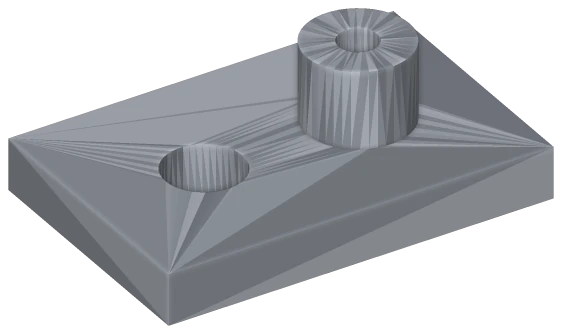
One face per triangle · 524 faces. Each hole is a ring of flat strips you cannot select or measure.
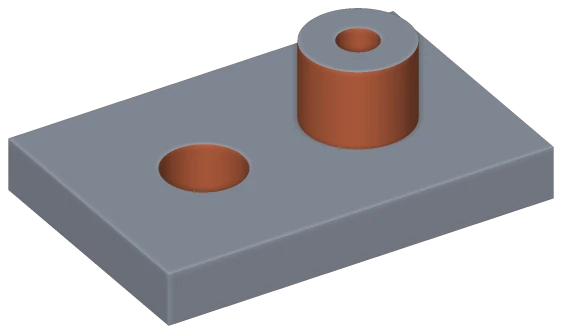
MeshWeave · 10 faces: 7 planes and 3 cylinders. The hole measures Ø12.00 mm.
Surfaces are only as accurate as the mesh they come from, and there is no feature history.
What changes between STL and IGES
Most requests for IGES now come from manufacturing, such as a CAM package, CNC software or a supplier whose system predates STEP. An STL is the file most people have, often the only one, because it is what the printer was given. IGES stores surfaces, not triangles. Writing the facets into it one by one would hand the machinist thousands of tiny faces.
Instead, the triangles are grouped into regions that lie on simple surfaces, and a fit is kept only when the region follows it closely. Those regions become true faces with real edges between them. Anything that fits nothing becomes a smooth patch. If recovery fails for the whole part, you get a faceted body instead. From a very dense STL that body is simplified to at most 30,000 flat faces so CAD programs can open it.
STL has no unit, so the numbers are taken as millimetres and the IGES is written in millimetres. Scale an inch model before converting. Recovered faces are only as accurate as the triangles behind them, so start from the finest export you have. Nothing else travels, because an STL carries nothing else.
Is the IGES just my triangles in another file?
Should I make IGES or STEP from my STL?
Can I convert STL to IGES in my browser?
Why does the faceted version have fewer faces than my STL?
What unit is the IGES in?
What if my STL has gaps?
Questions about daily limits, file sizes, privacy or deletion? They work the same for every conversion. See the FAQ and pricing.
Convert STL to something else
Convert something else to IGES
Going the other way? Convert IGES to STL.