Convert OBJ
to IGES.
Updated 2026-10-19
To convert OBJ (.obj) to IGES (.iges / .igs), drop the file below and download the result, in the browser with nothing installed. The mesh comes back as a IGES solid with real surfaces: a round hole becomes one cylindrical face.
2 solid-geometry conversions a day with no account. No card, no install.
On our servers. No account: deleted within 24 hours. Signed in: kept until you delete them. Never shared or used for training.
Planes, cylinders, cones and spheres are rebuilt as true surfaces where the triangles fit them, and freeform regions as smooth patches, in a closed solid that mates, measures and cuts like modelled geometry. Where they cannot be rebuilt the body is faceted instead, and every conversion says which of the two you got.
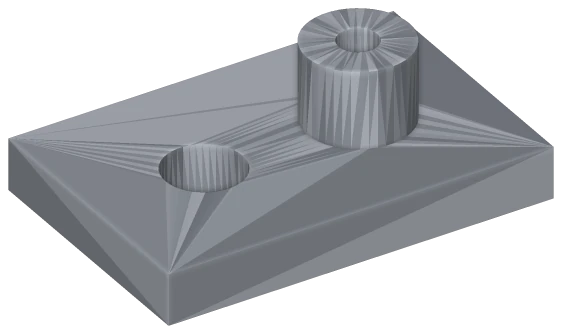
One face per triangle · 524 faces. Each hole is a ring of flat strips you cannot select or measure.
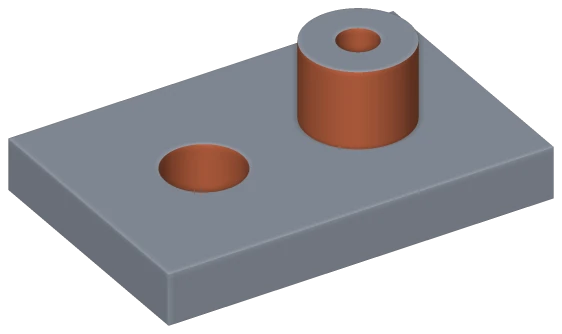
MeshWeave · 10 faces: 7 planes and 3 cylinders. The hole measures Ø12.00 mm.
Surfaces are only as accurate as the mesh they come from, and there is no feature history.
- Drop your .obj file above — up to 200 MB without an account.
- IGES is already selected as the output.
- Download the .iges. Without an account, files are deleted within 24 hours; signed in, they are kept until you delete them.
Wavefront OBJ file (.obj)
OBJ is a plain-text mesh format from graphics. Unlike STL it keeps named groups, texture coordinates, materials and polygon faces, which makes it the usual handover into rendering and texturing tools. It is still a mesh, not a solid.
The destination is a renderer, game engine, texturing tool or visualisation pipeline.
IGES file (Initial Graphics Exchange Specification) (.iges / .igs)
IGES predates STEP and is still requested by older CAM systems and mould and die workflows. It stores exact geometry, but many IGES files are loose trimmed surfaces that never close into a watertight solid. Unless someone asks for IGES by name, STEP is the better choice.
A CAM programmer, toolmaker or legacy system asked for IGES, or you were handed one and need something current.
Is the OBJ to IGES converter free?
Does the IGES result have real curves, or flat facets?
Will the IGES file open in Fusion 360, Inventor or Onshape?
Should I use IGES or STEP?
How big a file can I convert?
Is it safe to upload my OBJ file?
Is my OBJ file deleted after converting?
Keep the part open: fill it with a lattice, check it with FEA, texture a surface, or slice it into cut-ready sheets. These workspaces are in early access — create an account, then apply from inside the app.
Convert OBJ to something else
Convert something else to IGES
Going the other way? Convert IGES to OBJ.