Convert STL
to STEP.
Updated 2026-10-19
To convert STL to STEP, drop the .stl into the converter below and download the .step. Where the triangles fit them, planes, cylinders, cones, spheres and tori are rebuilt as true surfaces, so a round hole comes back as one cylindrical face with a radius you can measure, and the result is a closed solid. Where nothing fits, the region stays faceted, and the download says which you got. 2 solid conversions a day need no account. Many converters, FreeCAD's shape-from-mesh among them, give you one flat face per triangle instead.
2 solid-geometry conversions a day with no account. No card, no install. In your browser too: real surfaces, no daily limit, the file never uploaded.
On our servers. No account: deleted within 24 hours. Signed in: kept until you delete them. Never shared or used for training.
Planes, cylinders, cones and spheres are rebuilt as true surfaces where the triangles fit them, and freeform regions as smooth patches, in a closed solid that mates, measures and cuts like modelled geometry. Where they cannot be rebuilt the body is faceted instead, and every conversion says which of the two you got.
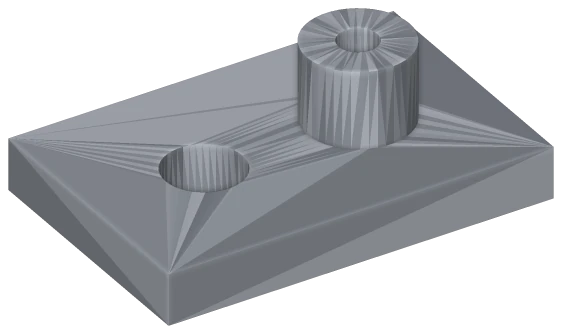
One face per triangle · 524 faces. Each hole is a ring of flat strips you cannot select or measure.
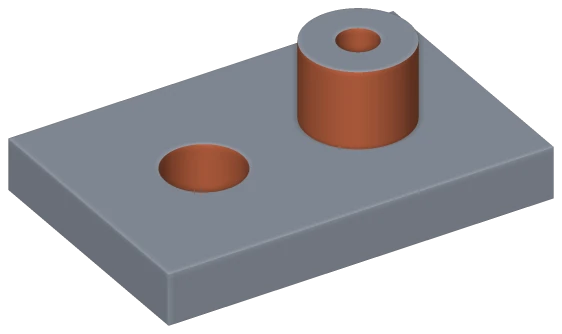
MeshWeave · 10 faces: 7 planes and 3 cylinders. The hole measures Ø12.00 mm.
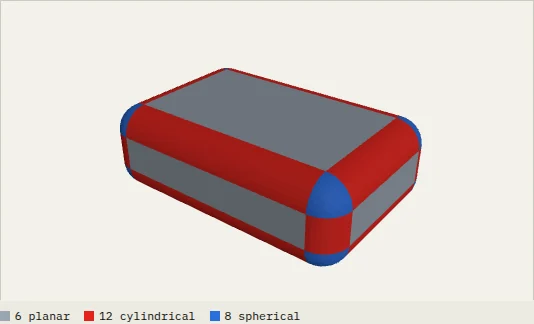
Box, R3 fillets on every edge · 9,452 triangles to 26 faces: 6 planar, 12 cylindrical, 8 spherical. 1.1 s.
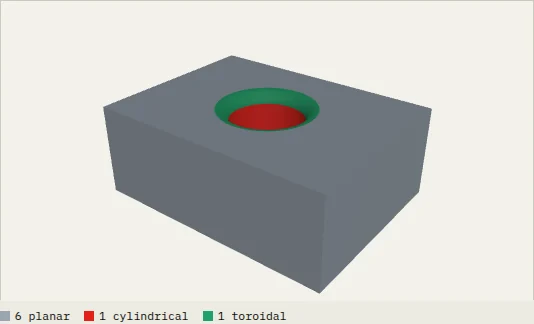
Block with a bore and a rim fillet · 8,584 triangles to 8 faces: 6 planar, 1 cylindrical, 1 toroidal. 403 ms.
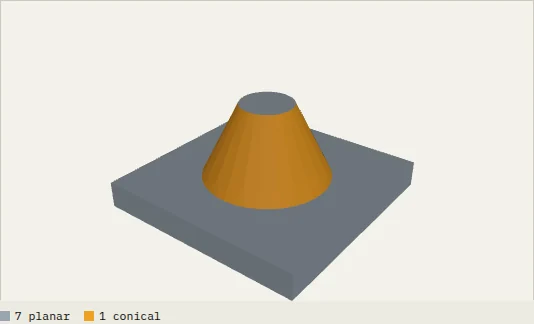
Cone on a plate · 1,272 triangles to 8 faces: 7 planar, 1 conical. 125 ms.
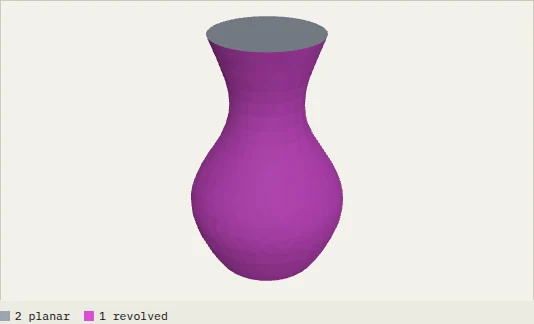
Vase, freeform profile · 9,088 triangles to 3 faces: 2 planar, 1 revolved. 874 ms.
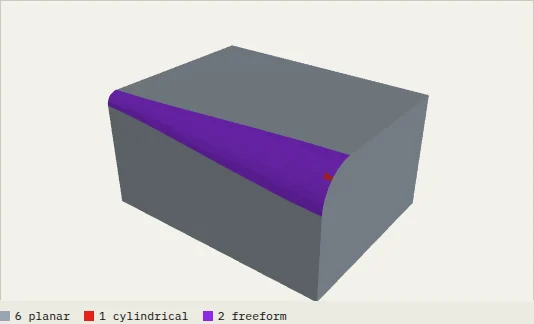
Variable-radius blend, 2 to 6 mm · 2,602 triangles to 9 faces: 6 planar, 1 cylindrical, 2 freeform. 628 ms.
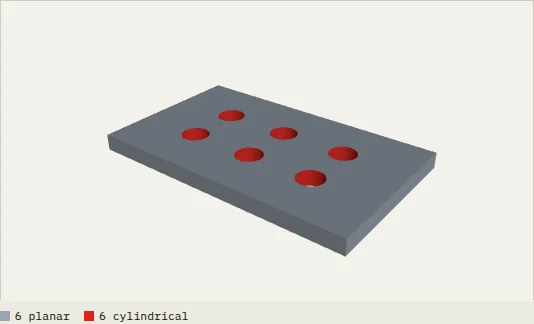
The plate sample · 1,188 triangles to 12 faces: 6 planar, 6 cylindrical. 119 ms.
Surfaces are only as accurate as the mesh they come from, and there is no feature history.
What changes between STL and STEP
An STL is a list of triangles: no surfaces, no edges, no unit. A STEP describes a solid with exact surfaces and edges. Wrapping the triangles in a STEP file, one flat face each, is easy, and it is what most converters do: the file opens, but a hole is a ring of slivers nobody can select or dimension.
Here the surfaces are recovered instead. Regions of the mesh that lie on a plane, cylinder, cone, sphere or torus are fitted, and each fit is kept only when every vertex lies close to it. Kept fits become true faces with real lines and circles between them; the figure on this page is one 524-triangle STL converted both ways.
Limits: accuracy follows the mesh, so start from the finest export you have. A sculpted or variable-radius region has no simple surface to find and becomes smooth patches or facets. An STL with gaps may arrive as surfaces rather than a solid. The numbers are read as millimetres, and there is no feature history to recover.
- Drop your .stl file above — up to 200 MB without an account.
- STEP is already selected as the output.
- Download the .step. Without an account, files are deleted within 24 hours; signed in, they are kept until you delete them.
STL file (stereolithography) (.stl)
STL is the lingua franca of 3D printing: a flat list of triangles. No unit, colour, material or history — a cylinder is a fan of flat strips. The missing unit is the classic cause of scale accidents. Every slicer and mesh tool reads it.
You are printing, meshing or sending to a bureau — where triangles are what is wanted.
STEP file (ISO 10303) (.step / .stp)
STEP (ISO 10303) is the closest thing engineering has to a universal solid format. It stores exact B-rep geometry — a hole is a cylindrical face, not a ring of facets. Fusion 360, Inventor, Onshape, SOLIDWORKS, Creo, NX, CATIA and FreeCAD all read it; .step and .stp are the same format. AP242 supersedes AP203 and AP214.
What you send when the other side has to keep modelling, quote machining, or open the shape in a different CAD system.
Is the STEP a real solid, or just triangles in a STEP file?
Why does my STL to STEP from another tool have thousands of faces?
What if my STL is not watertight?
What unit is the STEP in?
Is the STL to STEP converter free?
Does the STEP result have real curves, or flat facets?
Will the STEP file open in Fusion 360, Inventor or Onshape?
Can you turn the triangles back into proper CAD surfaces?
How big a file can I convert?
Is it safe to upload my STL file?
Is my STL file deleted after converting?
Keep the part open: fill it with a lattice, check it with FEA, texture a surface, or slice it into cut-ready sheets. These workspaces are in early access — create an account, then apply from inside the app.
- STL to STEP with true surfaces — You have an STL and someone needs a STEP.
Convert STL to something else
Convert something else to STEP
Going the other way? Convert STEP to STL.